Discover Your Hanover with a season of extraordinary live theatre, moving dance, and powerful storytelling. Subscribe to the 2026/2027 Broadway, Dance, or THT Rep Series for the best seats, the best prices, and exclusive subscriber benefits!
“I am ecstatic to say the best of Broadway will be right here at the Hanover next year! We are fortunate to have seven shows in our 26/27 Broadway Series, including six Worcester premieres. The laughs won’t stop during Spamalot and Shucked; the melodies will soar in The Bodyguard and The Wiz; the wonder will astound at Cirque Alice and Water for Elephants; and Mexodus will take us on a journey most of us never knew existed. The full season is truly spectacular and I cannot wait to experience these shows with you.”
-Alan Seiffert, President & CEO
Show Dates
Spamalot October 2-4, 2026 The Bodyguard November 6-8, 2026 Cirque Alice January 29-31, 2027 Water for Elephants February 26-28, 2027 Mexodus March 19-21, 2027 Shucked April 30 – May 2, 2027 The Wiz May 14-16, 2027
Looking for additional flexibility or other options?
Can’t make it to every show this season? Experience the best of the 26/27 Broadway Series starting in 2027! Our 5-show fixed subscription covers performances from January to May, offering you all the same subscriber benefits—including savings.
Call the box office during regular business hours at 877.571.7469, email the customer service and sales team at [email protected], or visit us in person at The Hanover Theatre box office to secure your seats and savings.
2026/2027 Dance Series
SEE YOUR MOVE
“The four companies joining our 26/27 Dance Series are simply breathtaking. From the physical poetry of Pilobolus to the cultural innovation of Ballet Hispanico to the propulsive star power of Burn the Floor, not to mention the 100th anniversary celebration of the primal artistic force that is the Martha Graham Dance Company, I cannot wait for you to experience this year’s series. No matter how your love for dance began, I am certain it will only grow when you witness these companies.”
-Alan Seiffert, President & CEO
Show Dates
Pilobolus October 23, 2026 Ballet Hispánico March 4, 2027 Martha Graham Dance Company April 24, 2027 Burn the Floor May 5, 2027
“As THT Rep embarks on its sixth season, New England audiences continue to be astounded by the high-caliber programming, performances, and design of our resident professional theatre company. Led by Artistic Director Livy Scanlon, the 26/27 THT Rep Series will introduce us to three unique worlds that promise to unearth fresh perspectives on classic stories and unique characters. I am eager to witness the undying love between Juliet and her Romeo, celebrate the songs and styles of Hedwig, and join in on the party with Juicy’s family. I hope you join us at the BrickBox this season – I know it will be a season to remember.”
-Alan Seiffert, President & CEO
Show Dates
Poe Double Header October 28 – November 1, 2026 Hedwig and the Angry Inch February 3-21, 2027 Fat Ham March 31 – April 11, 2027
BEST SEATS! Choose the best seats before single tickets go on sale to the public. New this year, new subscribers can select their seats online!
BEST PRICE! Save up to 20% on Broadway and Dance, and save $10 per ticket on THT Rep. Plus, get additional tickets at a discounted subscriber rate.
UPGRADES: First access to upgrade your seats each year.
FLEXIBILITY: Easily swap tickets for a different performance of the same show to best fit your schedule. New this year, exchanges will be available online!
DIGITAL TICKETS: Access your digital tickets at any time and secure them from fraudulent use.
BUDGET FRIENDLY: Take advantage of interest-free monthly payment plans.
FIRST ACCESS TO SEASONAL FAVORITES: Subscribers have first access to tickets for THT Rep’s Edgar Allan Poe Double Header, The Nutcracker, A Christmas Carol, and The Boston Pops.
SPECIAL DISCOUNTS: Save 10% and enjoy early access to tickets for other popular shows. Plus, enjoy free admission to historic tours of the theatre and Mighty Wurlitzer concerts.
AUTOMATIC RENEWAL: Effortlessly secure your seats for next season.
Subscribe for First Access to These Seasonal Favorites
If you have any questions, review our subscriber FAQs or contact our box office at 877.571.7469 or [email protected].
Subscriber FAQs
What is a subscription?
One subscription gets you one ticket to each of the shows in the series. Subscribing guarantees you the same great seat for each show in the series. Don’t miss out on the best seats at the best price.
Looking for additional flexibility or other options?
Call the box office during regular business hours at 877.571.7469, email the customer service and sales team at [email protected], or visit us in person at The Hanover Theatre box office to secure your seats and savings.
Why are you renewing me automatically?
To make sure you don’t lose access to your seats! Don’t worry, if something comes up and you don’t want to renew your subscription, you will always have a 30-day window to cancel with a full money-back guarantee.
What if I don't like my seats?
Still renew! That way you won’t lose anything. All subscribers will have the opportunity to look at upgrade options following our 30-day renewal period. Subscribers will receive an email invitation to look at upgrade options by email likely in early May.
What about changing days of the week? Adding or removing a seat to my package?
Same thing. Renew now and you’ll have the option this spring.
What if I can’t attend on a specific date?
You’ll be able to exchange your tickets into another performance of the same production, subject to availability. All exchanges must be completed at least 48 hours in advance.
How do I know which date my THT Rep tickets will be for?
Just select your preferred day of the week for now and we will place you into the right date for each show. If you discover you can’t make that date at a later point, you can always exchange into a different performance of the same production, regardless of day of week!
How do I get to the theatre and where can I park?
Whether you’re driving and parking in a nearby garage, taking public transportation, or walking, getting to the theatre is a breeze.
Can I update the credit card being used for my payment plan?
You can add new credit cards to your account online but you will need to contact the customer service and sales team during regular business hours at 877.571.7469 to change the card being used for your payment plan.
Subscriber Ticket FAQs
Can I exchange my tickets for individual performances online?
Yes. As a subscriber, you have the flexibility to exchange your tickets online for a different performance of the same show, allowing you to find the best fit for your schedule. To make an exchange, simply log into your account and follow the steps below.
*Pro Tip: We recommend exchanging tickets on your mobile device for the simplest and quickest transaction.
Mobile Instructions
To download printable mobile instructions, click here.
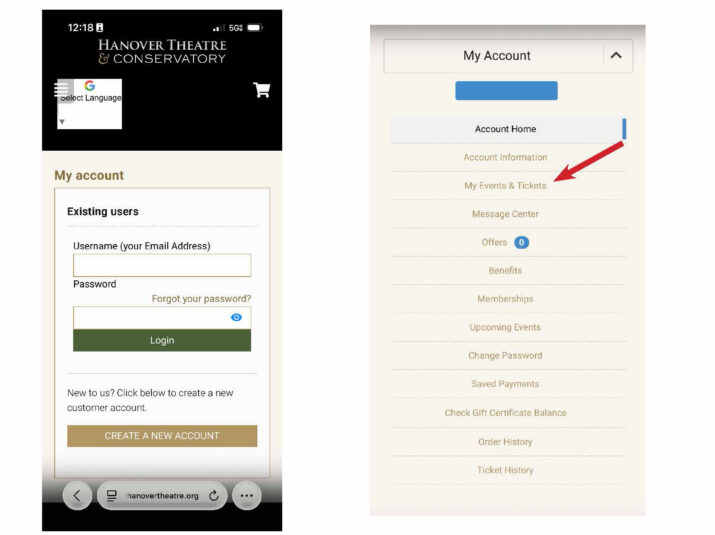
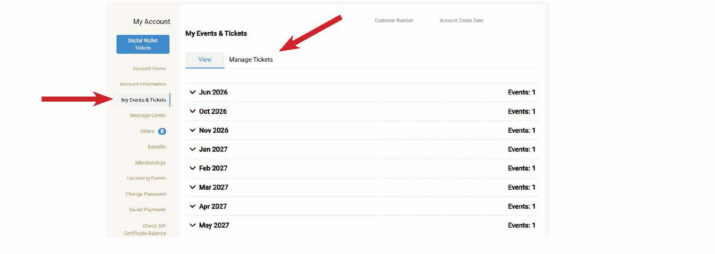
Step 1: Login into your Hanover Theatre account at TheHanoverTheatre.org/login or click HERE. Step 2: Click “My Events & Tickets”.
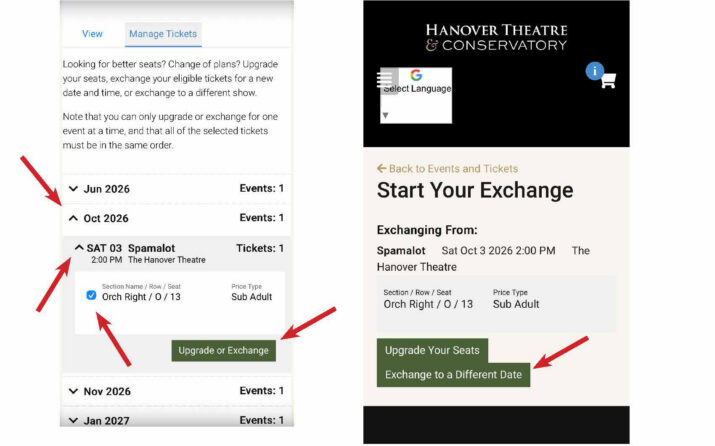
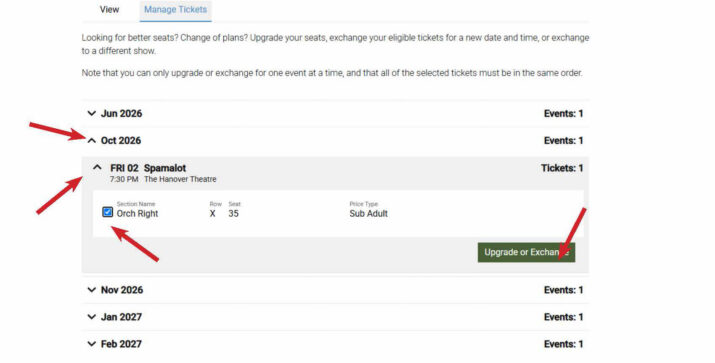
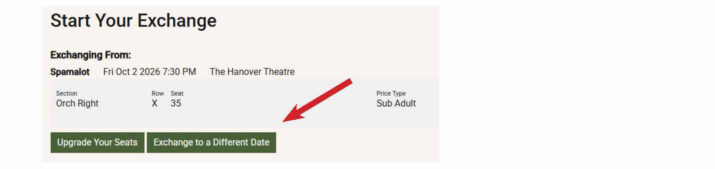
Step 3: Click “Manage Tickets.” Step 4: Click on the caret for the month of your event. Step 5: Click on the caret for your event. Step 6: Click on the checkbox next to your ticket location and select “Upgrade or Exchange.” Step 7: Click on “Exchange to a Different Date.”
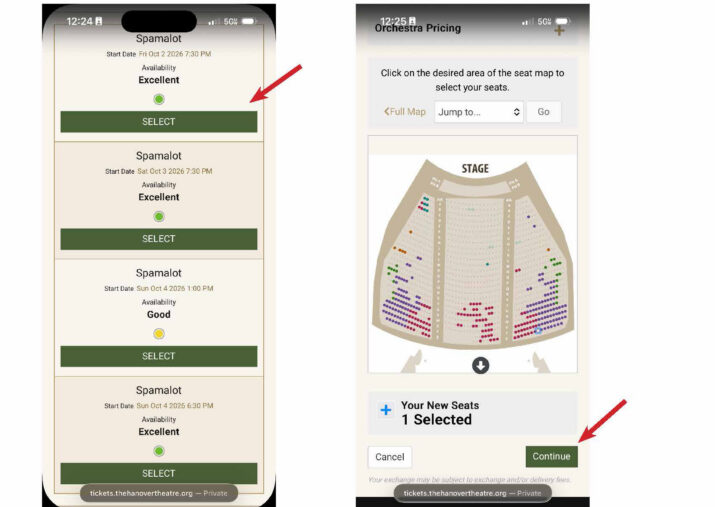
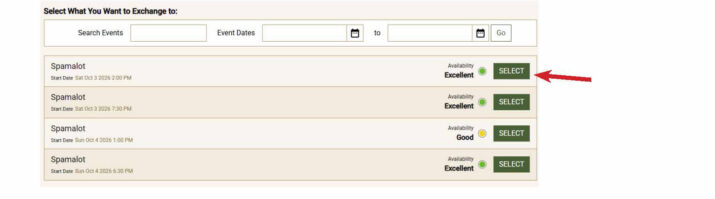
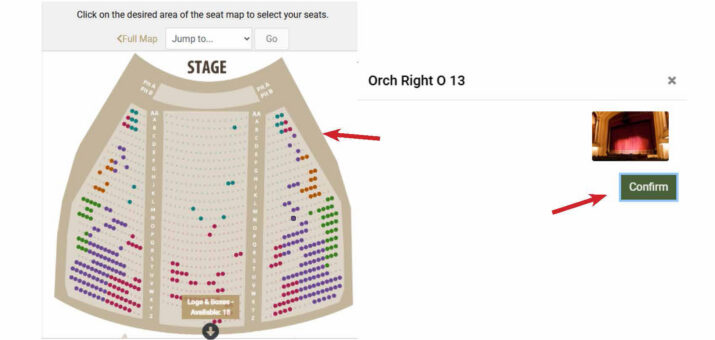
Step 8: Select the new date you want to exchange to. Step 9: Choose your desired seat(s) and click continue.
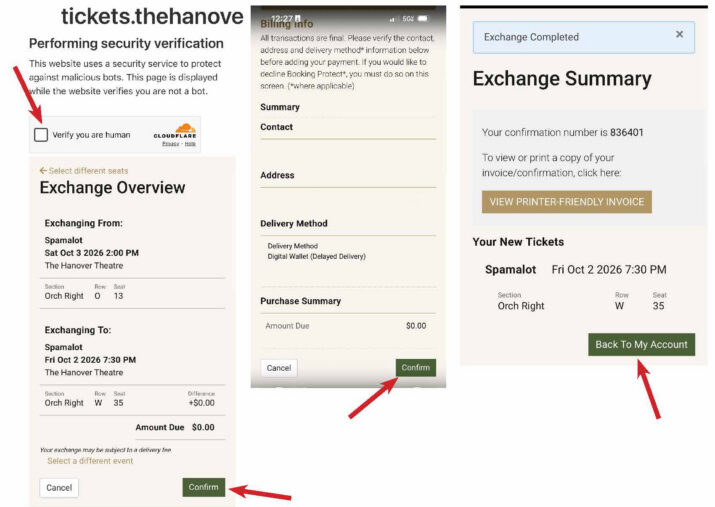
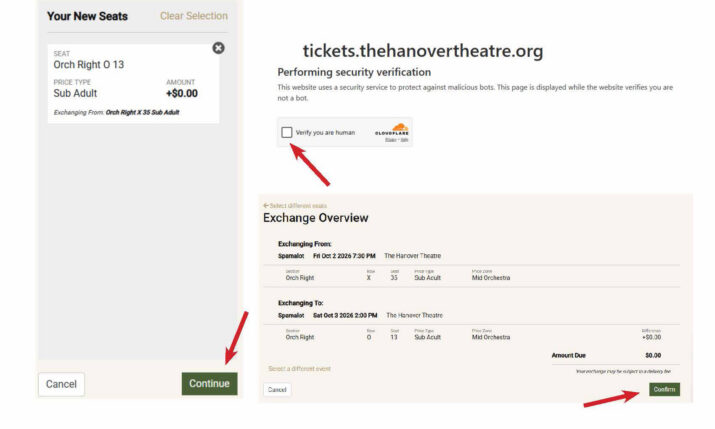
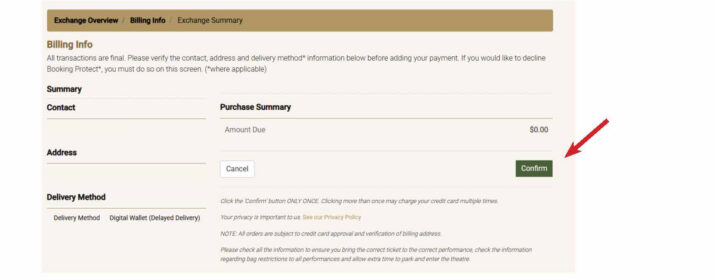
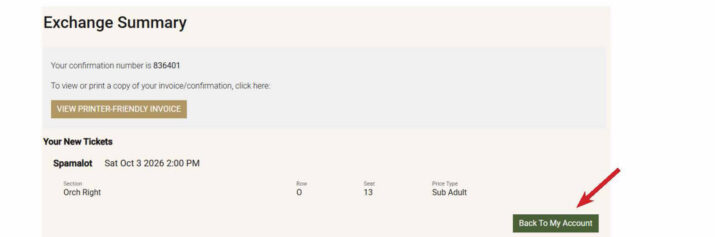
Step 10: Complete the verification and confirm your exchange. Step 11: Confirm your information. Step 12: You can review the entirety of your order or just return to your account home.
Desktop Instructions
To download printable desktop instructions, click here.
Step 1: Login into your Hanover Theatre account at TheHanoverTheatre.org/login or click HERE.
Step 2: Click “My Events & Tickets” and then click “Manage Tickets.”
Step 3: Click on the caret for the month of your event. Step 4: Click on the caret for your event. Step 5: Click on the checkbox next to your ticket location and select “Upgrade or Exchange.”
Step 6: Click on “Exchange to a Different Date.”
Step 7: Select the new date you want to exchange to.
Step 8: Choose your desired seat(s) and click confirm.
Step 9: Click continue. Step 10: Complete the verification and confirm your exchange. Please note if you exchange your ticket to a higher price point, there will be an amount due that will have to paid at the time of the exchange.
Step 11: Confirm your information.
Step 12: You can review the entirety of your order or just return to your account home.
Terms & Conditions
TERMS & CONDITIONS: All subscribers are subject to the details on this page. By purchasing a subscription, you agree to these Terms & Conditions.
AUTOMATIC RENEWAL: Subscribers are automatically renewed each season into a full subscription package. Package prices and details vary each season. The credit card on your account with the latest expiration date will be charged the then-current subscription price in six monthly installments. You have 30 days from the date the season is announced to cancel your subscription renewal via the cancellation link in the email or by contacting the box office directly. If your card is not valid or cannot be added to the order, you will be notified via email to contact the box office to keep your seats.
RENEWAL DEADLINE: The renewal deadline is 30 days from the date the season is announced. If we are unable to automatically renew your subscription, you have until the renewal deadline to accept your subscription offer in your online account. The 2026/2027 season announce date was Monday, March 30, 2026.
PRICING: The price of your subscription seat reflects the face value of the tickets as well as any handling fees.
UPGRADES: A few weeks after the renewal deadline, all renewed subscribers will be emailed information on when upgrades will be available. If you are happy with your seats, no action is needed. If you want to make any changes to your subscription, whether it’s number of packages, day of week, or seating location, follow the instructions outlined in the email.
EXCHANGES: The ability to exchange individual shows will begin soon after the upgrade window. Exchanges must be completed at least 48 hours prior to the show. The difference in price is due at the time of the exchange or upgrade if moving into a higher priced performance or seating location. Ticket exchanges are subject to availability.
ADDITIONAL TICKETS: The benefit of purchasing additional tickets to the individual shows in the series packages prior to public on sale will be available after the upgrade window. Additional tickets are subject to availability.
ACCESSIBLE SEATING: To inquire about accessible seating options, please contact the box office at 877.571.7469 during regular business hours or email [email protected]. Note: seating for THT Repertory is general admission.
AUDIENCE ADVISORY: Not every production is appropriate for all ages. Patrons are encouraged to familiarize themselves with shows offered to make informed decisions prior to purchasing a season subscription or additional tickets.
For general theatre questions, visit our FAQs or contact the box office at 877.571.7469 during business hours.